If you are wondering how to pin a comment on TikTok, you are not alone. A pinned comment is a comment that stays fixed at the top of your video’s comment section, making it the first thing viewers see when they open the discussion. TikTok creators use this feature to highlight important information, answer common questions, share updates, or draw attention to a funny or engaging reply. It is a simple tool, but it can make a big difference in how people interact with your content.
Knowing how to pin a comment on TikTok can help you guide conversations, boost engagement, and keep your comment section organized. Whether you want to promote a key message or spotlight a fan comment, pinned comments can be very effective. In this guide, you will learn the exact steps to pin and unpin comments, plus troubleshooting tips if the feature is not working properly.
What Does It Mean to Pin a Comment on TikTok?
A pinned comment on TikTok is a comment that a creator chooses to keep at the very top of the comment section on a video. Instead of getting buried under newer replies, it stays visible so viewers notice it first when they open the discussion. This feature is useful because it lets creators highlight comments that matter most.
Many creators pin comments that are helpful, funny, or important. For example, they might pin an answer to a frequently asked question so viewers can get quick information without asking again. Others may pin a funny fan comment to make the post more entertaining and encourage more interaction. Some creators also use pinned comments as a call to action, such as asking viewers to follow, watch part two, or check the link in bio.
Why Pinning a Comment on TikTok Matters
Pinning a comment on TikTok matters because it helps creators make the most important message stand out right away. Since the pinned comment stays at the top of the comment section, it can highlight a strong conversation starter and encourage more people to join in. This often improves engagement because viewers are more likely to reply when they see a question, a funny remark, or a clear discussion point first.
Pinned comments are also useful for answering common viewer questions quickly. Instead of repeating the same reply over and over, creators can pin one helpful comment so everyone sees it. This saves time and keeps the conversation clear. It also helps shape the tone of the comment section by placing a positive, informative, or entertaining comment front and center.
For creators, this is a simple way to guide audience interaction. For brands and small businesses, pinned comments can draw attention to promotions, updates, or clarifications. For personal accounts, they can highlight humor, appreciation, or key context. Overall, pinned comments make the comment section feel more organized and purposeful.
How to Pin a Comment on TikTok: Step-by-Step Instructions
Step 1: Open the TikTok app
Start by opening the TikTok app on your phone or tablet. Before doing anything else, make sure you are logged into the correct account. You need to be signed in as the creator of the video, because only the account owner can pin comments on their own TikTok post.
Step 2: Go to your video
Next, visit your profile and open the video where you want to pin a comment. Choose the specific post where the comment appears, since pinned comments only apply to that individual video and not to your whole account.
Step 3: Open the comments section
Tap the comment icon on the right side of the screen. This will open the full comment section for that video, where you can scroll through viewer replies and find the one you want to feature.
Step 4: Find the comment you want to pin
Look for a comment that is useful, positive, funny, or relevant to the video. Many creators pin comments that answer a common question, highlight a fan reaction, or encourage more engagement from viewers.
Step 5: Press and hold the comment
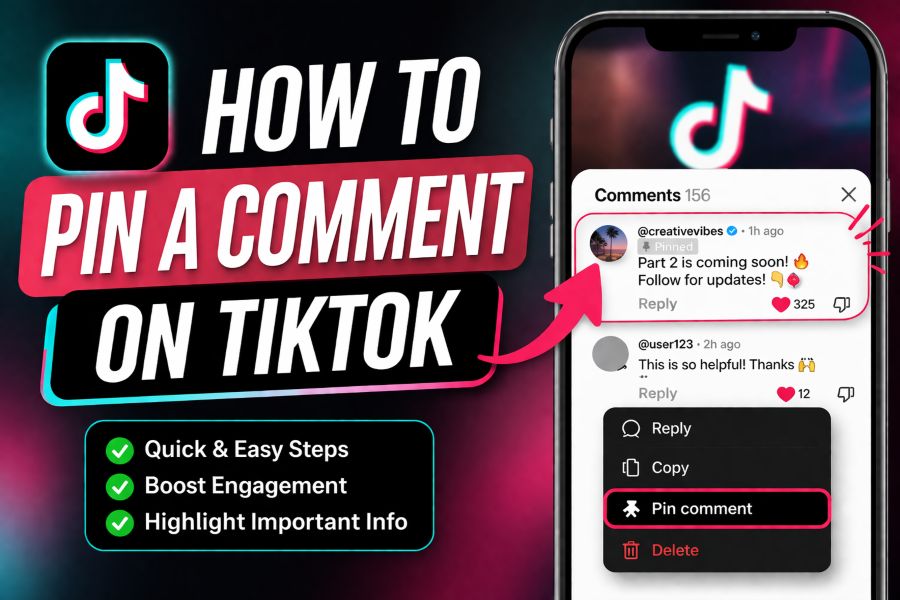
Once you find the right comment, press and hold it for a moment. A small menu should appear with different options related to comment management.
Step 6: Tap “Pin comment”
From the menu, tap “Pin comment.” After you do this, the selected comment will move to the top of the comment section so it is the first one viewers see.
Usually, you can pin only one comment per video. If you want to feature a different one later, you will need to unpin the current comment first.
Best Types of Comments to Pin on TikTok
Choosing the right comment to pin on TikTok can make a big difference in how viewers respond to your video. The best pinned comments usually add value, encourage engagement, or help set the tone for the discussion.
Helpful comments
Helpful comments are a smart choice when viewers keep asking the same question. Pinning a clear answer can save time and give new viewers useful information right away.
Funny comments
Funny comments are great for boosting entertainment value. A memorable joke or clever reaction can make your content feel more engaging and encourage others to join the conversation.
Supportive comments
Positive and supportive comments can help build a stronger sense of community. Pinning kind feedback or encouraging words shows appreciation and creates a welcoming atmosphere.
Comments that encourage action
Some comments work well because they guide viewers toward the next step. For example, you can pin comments that encourage people to watch part two, visit the link in bio, or share their opinions.
Avoid pinning rude, confusing, or off-topic comments. It is always best to choose comments that fit your brand voice and support the message of your content.
Best Types of Comments to Pin on TikTok
Choosing the right comment to pin on TikTok can shape how people react to your video. The best pinned comments usually add value, spark conversation, or reinforce the message of your content.
1. Helpful comments
Helpful comments are one of the best choices to pin because they answer questions viewers keep asking. If people want to know where you bought something, how you made the video, or what product you used, pinning a clear answer can save time and improve the viewer experience.
2. Funny comments
Funny comments can boost entertainment value and make your post feel more engaging. A clever or memorable fan comment often encourages others to reply and join the conversation.
3. Supportive comments
Supportive comments are great for building community. Pinning a positive message, kind feedback, or an encouraging response can make your comment section feel more welcoming and genuine.
4. Comments that encourage action
Some comments work well because they guide viewers toward the next step. For example, you can pin a comment that tells viewers to watch part two, visit the link in bio, or share their thoughts.
Avoid pinning rude, confusing, or off-topic comments. Always choose comments that match your brand voice and support your content goals.
Frequently Asked Questions About TikTok Pinned Comments
Can you pin your own comment on TikTok?
Yes, creators can pin their own comment on their own TikTok video. This can be useful if you want to highlight important information, add context, answer a common question, or direct viewers to take a specific action. For example, you might pin your own comment to tell people where to find a product link or to invite them to watch part two.
How many comments can you pin on TikTok?
TikTok usually allows only one pinned comment per video. If you want to feature a different comment, you will need to unpin the current one first and then select a new comment to pin at the top of the discussion.
Can other people see a pinned comment?
Yes, other people can see a pinned comment. It appears at the top of the comment section, so it is often the first comment viewers notice when they open the discussion on your video.
Can you change a pinned comment later?
Yes, you can change a pinned comment later. To do this, simply unpin the current comment and then pin a different one that better matches your goals or the current conversation.
Does pinning a comment help engagement?
Pinning a comment can help engagement because it encourages more replies, highlights key information, and helps guide the conversation in a clear direction.
Final Thoughts on How to Pin a Comment on TikTok
Learning how to pin a comment on TikTok is a simple but useful way to manage your comment section more effectively. It only takes a few seconds, yet it can improve visibility, boost engagement, and give you more control over the conversation on your video. Whether you want to highlight a helpful answer, a funny response, or an important update, pinned comments can help direct attention where you want it. As you continue creating content, test different pinned comments to see which ones connect best with your audience. Try pinning a comment on your next TikTok video and see how your audience responds.